
_055d65.png)
_ee1da0.png)
OpenYour Eyes
Mitglieder
-
Benutzer seit
-
Letzter Besuch
-
 OpenYour Eyes hat das Profilbild geändert
 -
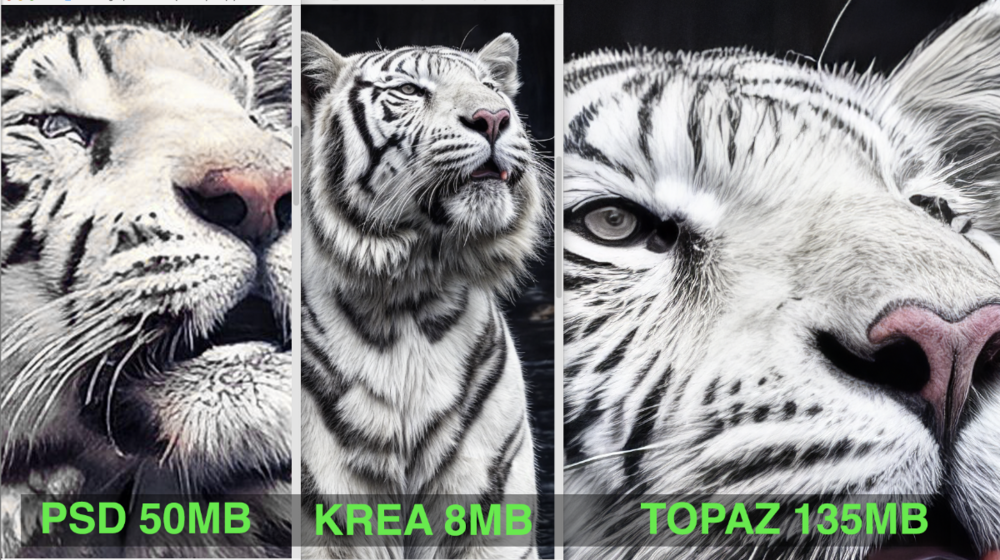
Hallo zusammen, hier kommt mein erster Beitrag/Frage in diesem tollen Forum: Ich nutze seit neuestem die Funktion Bild generieren in PS, indem ich eine Fläche anlege, z.B. DIN A3 und dann meinen Prost mit entsprechendem Vorgabebild eingebe. Die Ergebnisse sind super, vor allem sind sie extrem groß, eben DIN A 3 groß 😉 Das kann ja meines Wissens im Moment kein anderes Programm. Jetzt wollte ich aber die Details und Qualität in Krea.ai verbessern lassen, lade das Bild also, stelle das Umschling auf x8 und bekomme: tadaa... ein kleines Bild als vorher, wenn auch deutlich besser in den Details. Danach schmeiße ich dieses Bild wieder in Topaz Foto mit 2x vergrößern und dann sieht es sehr brauchbar aus. Nun wollte ich wissen, ob es da nicht einen "kürzeren" Weg gibt. Ich freue mich über jeden Hinweis, und bitte langsam schreiben, ich bin KI-Anfänger, danke.... Kai